Eliminating Manual Data Entry from PDFs with AI: A Production Pipeline
A very common problem: organizations often have folders full of PDF CVs and someone has to manually extract information into a spreadsheet—slow, error-prone, and impossible to scale. I built a pipeline to eliminate that task entirely.
The Real Cost Is Not the Time Per Document
When someone tells me "data entry takes 15 minutes per CV," the instinct is to calculate hourly savings. But that's the wrong frame. The real cost is what doesn't happen because the team is stuck doing manual transcription — analysis that doesn't get run, patterns that don't get spotted, decisions that get delayed.
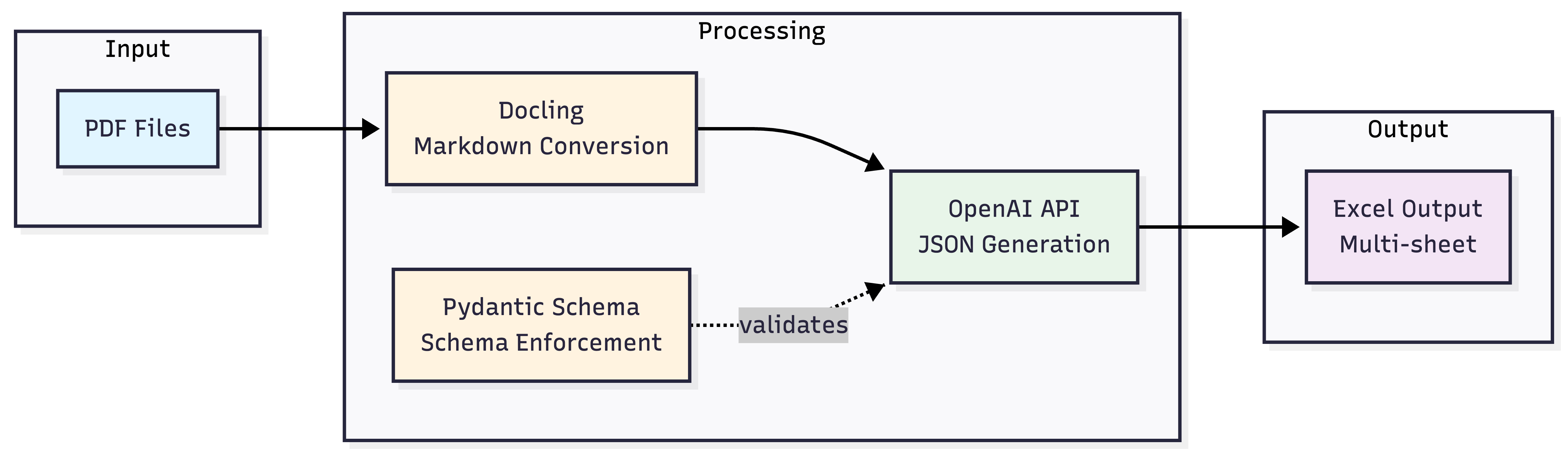
The pipeline I built processes a directory of PDFs, extracts every relevant field from each document, validates the output against a strict schema, and appends the results to a structured Excel workbook. The whole thing runs unattended as a cron job or in a Prefect Workflow.
From RRHH Problem to Technical Architecture
The starting point was a real request: the HR team needed a searchable database of candidates from a folder of CVs. The documents had no consistent format — some were designed with heavy styling, others were plain text exports. No two CVs looked the same.
The pipeline has four stages:
- File discovery and caching — walk the directory, skip already-processed files using SHA-256 hashing
- PDF to Markdown conversion — parse each document with Docling
- Structured extraction — send the Markdown to OpenAI with a Pydantic schema enforced via Structured Outputs
- Persistence — append the extracted data to a multi-sheet Excel workbook
Why Markdown as the Intermediate Format
Sending raw PDF bytes to an LLM is not a good idea in practice. PDFs are binary files — the text extraction depends heavily on how the file was generated, and the output is often polluted with layout artifacts, character encoding issues, and scrambled reading order.
Docling converts PDFs to clean Markdown, preserving logical structure: headers, bullet points, tables. This matters because the LLM reads the document more like a human would, rather than trying to parse a stream of coordinates and glyph codes. It also reduces token count significantly compared to naive extraction approaches.
from docling.document_converter import DocumentConverter

converter = DocumentConverter()
result = converter.convert(file_path)
markdown_text = result.document.export_to_markdown()
The Markdown output is clean, human-readable, and optimal for LLM processing. If something goes wrong in the extraction, you can inspect the intermediate file directly.
The Piece That Makes It Production-Ready: Pydantic + Structured Outputs
This is the core insight. A standard chat completion call will return text that looks like JSON — until it doesn't. Field names drift, optional fields get omitted silently, nested structures flatten unexpectedly. Running that against hundreds of documents means your database slowly fills with inconsistencies that are expensive to fix later.
OpenAI Structured Outputs changes the contract. Instead of asking the model to "please respond in JSON," you pass a Pydantic model as the response_format parameter. The API guarantees the output conforms to that schema — validated before it reaches your code.
from pydantic import BaseModel
from typing import List, Optional

class Experience(BaseModel):
    company: str
    location: Optional[str]
    role: str
    start_date: Optional[str]
    end_date: Optional[str]
    responsibilities: Optional[List[str]]

class Curriculum(BaseModel):
    full_name: str
    email: str
    phone: Optional[str]
    summary: Optional[str]
    experience: List[Experience]
    education: Optional[List[Education]]
    skills: Optional[List[Skill]]
    languages: Optional[List[Language]]
    certifications: Optional[List[str]]
The API call is straightforward:
from openai import OpenAI

client = OpenAI()

response = client.beta.chat.completions.parse(
    model="gpt-4o-mini-2024-07-18",
    messages=[
        {
            "role": "user",
            "content": f"Extract all candidate data from this CV:\n\n{markdown_text}"
        }
    ],
    temperature=0,
    max_tokens=15000,
    response_format=Curriculum,
)

data = response.choices[0].message.parsed
temperature=0 is deliberate — this is extraction, not generation. Deterministic output is the goal. The model behaves like an intelligent data entry operator: it reads the document and populates the schema fields, nothing more.
Caching: Why It Matters More Than You'd Think
A pipeline that reprocesses every document on every run is not a pipeline — it's a script you're afraid to run twice. The caching mechanism uses SHA-256 hashes of the file contents stored in a flat .hashes.txt file.
import hashlib

def calculate_file_hash(file_path: str) -> str:
    hasher = hashlib.sha256()
    with open(file_path, "rb") as f:
        for chunk in iter(lambda: f.read(8192), b""):
            hasher.update(chunk)
    return hasher.hexdigest()

def is_already_processed(file_path: str) -> bool:
    file_hash = calculate_file_hash(file_path)
    with open(".hashes.txt", "r") as f:
        existing = f.read().splitlines()
    return file_hash in existing
Chunked reading in binary mode keeps memory usage flat regardless of file size. The hash check costs microseconds and saves an API call that costs real money. With gpt-4o-mini, each CV costs roughly $0.002 — negligible per document, but not if you're reprocessing 500 files every morning.
The Same Pattern Extends to Invoices
One of the clearest signs that an architecture is solid is how easily it accommodates a second use case without structural changes. After validating the CV pipeline, I applied the same pattern to invoice extraction — a completely different document type with different fields (CUIT, CAE, line items, tax breakdowns).
The only change was the Pydantic model. The pipeline — discovery, hashing, Docling conversion, OpenAI call, Excel output — was identical. This is the value of separating the schema definition from the extraction logic.
Results
The pipeline runs daily via cron. A folder of CVs that previously required a dedicated morning of manual data entry now produces a fully structured, multi-sheet Excel workbook — candidates, work history, education, skills, certifications — each in its own normalized sheet, with a foreign key linking back to the candidate record.
The HR team's time shifted from transcription to analysis. That's the actual outcome worth measuring.
Key Takeaways
The combination of Docling, OpenAI Structured Outputs, and Pydantic is not just a convenient stack — it's an architecture decision. Each component has a specific role:
- Docling handles the unpredictability of PDF formats before the LLM ever sees the document
- Pydantic defines the contract your data must conform to
- Structured Outputs enforces that contract at the API level, not in post-processing
- SHA-256 caching makes the pipeline safe to run repeatedly without waste
Any of these pieces in isolation is useful. Together, they produce something you can actually run in production.
Explore the Project
The full implementation — including the invoice extraction notebook and Excel formatting code — is available on GitHub:
github.com/Joaquin-Urruti/openai-structured-outputs
If you're evaluating whether this type of pipeline fits a document processing problem in your organization, I'm happy to talk through it. You can reach me via LinkedIn or book a call directly.