Deployment of a Geospatial Platform for Professional Presentation of GIS Work
Case Study Summary
Client: Independent GIS Professional Industry: Geospatial Technology / Open Source
Impact Metrics:
- Platform deployed and running in production
- 7 Docker containers successfully orchestrated
- 2 critical technical issues resolved during implementation
- Implementation time: ~2 weeks
- 99% monthly uptime target
Summary
GeoNode is an open source web-based geospatial platform that can be deployed for an independent GIS professional or any organization that needs to publish maps, dashboards, or web content based on geospatial layers. The project consisted of deploying GeoNode on a dedicated server using Docker Compose, facing and resolving technical challenges related to port conflicts and health check configuration. The platform provides a centralized hub for publishing professional projects with client access and full control for the publisher.
The Challenge
As an independent professional, I decided to set up my own platform to publish and share cartographic projects with a simple client experience and real room to scale. The key decision factors were:
Limited budget: Existing dedicated server, with no resources for managed solutions.
Need for full control: I wanted my own platform, not external services like ArcGIS Online. A self-hosted platform with full control over data, permissions, updates, and backups.
Client accessibility: Clients must be able to view projects without technical training, with browser-based visualization, no training required.
Flexibility to scale: Catalog, metadata, roles, collaboration, styles.
Integration with the GIS stack: Standards and interoperability (OGC).
Reusable foundation for future projects: Templates and a repeatable workflow.
Technical Requirements
| Requirement | Description |
|---|---|
| Web GIS platform | GeoNode as the base |
| Docker containers | Ease deployment and maintenance |
| GeoServer included | OGC services (WMS, WFS) |
| HTTPS | Valid certificates |
| Public access | Ability to publish maps with/without authentication |
Success Criteria
- Operational platform with 99% uptime
- GeoServer accessible for administration
- Public layers visible without login
- Maintainable by the owner
Technical Approach
Technology Stack & Architecture
System Architecture
The solution implements a microservices architecture with 7 Docker containers:
Components:
- nginx: Reverse Proxy (ports 80, 443)
- Kong: API Gateway (port 8001)
- Django: GeoNode web application (port 8000)
- GeoServer: OGC map server (port 8083)
- PostgreSQL/PostGIS: Spatial database (port 5432)
- Redis: Cache and message broker (port 6379)
- Memcached: Additional cache (port 11211)
- Celery: Background task processing
Data flow: nginx/Kong → Django → GeoServer/PostgreSQL
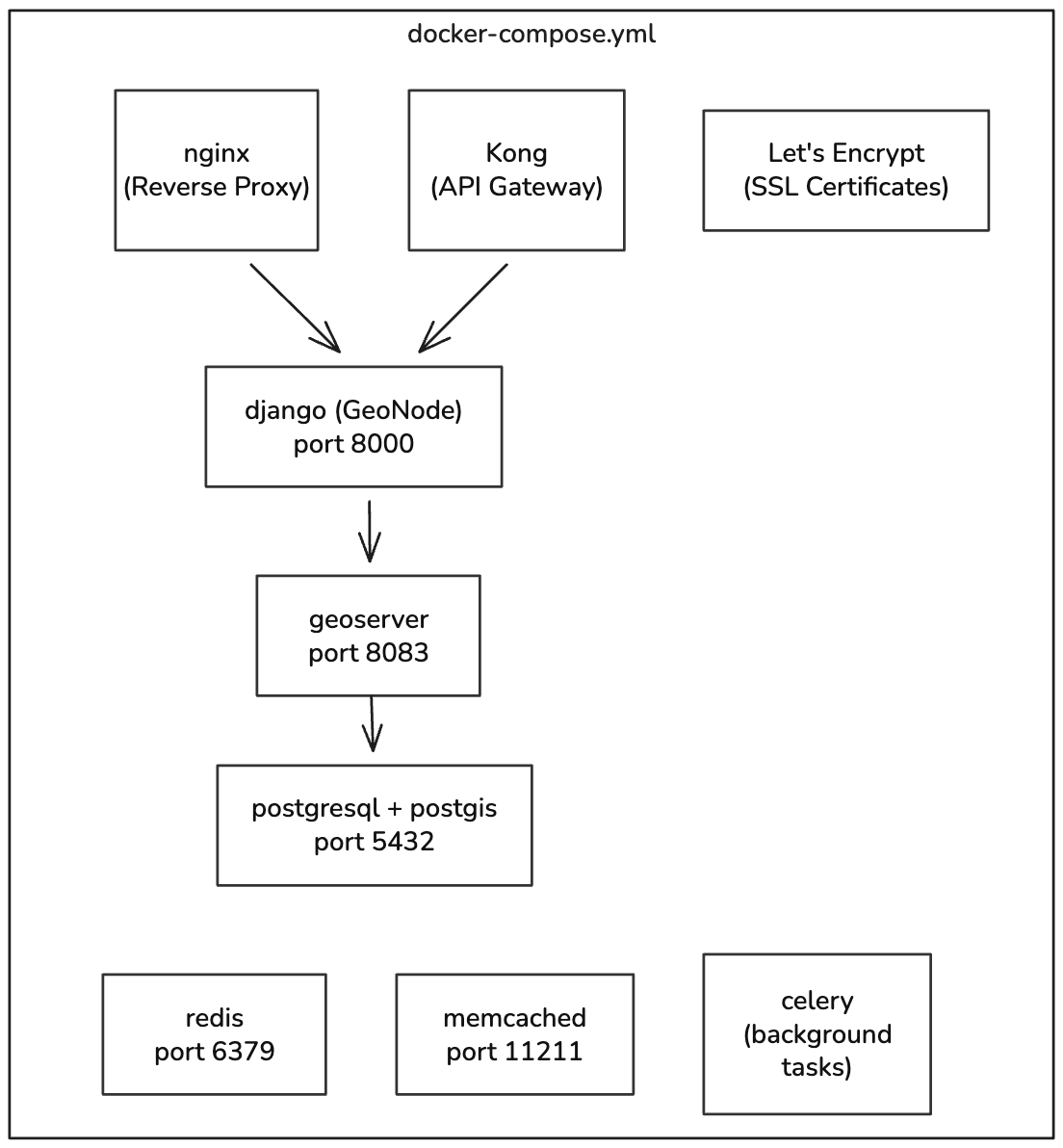
Container architecture
Implementation Highlights
Project Phases
Phase 1: Preparation
- Initial server setup
- Docker and Docker Compose installation
- GeoNode repository cloning
- .env file configuration
Phase 2: Initial Deployment - Bringing up base containers - Running database migrations - Environment variable configuration - Creating an admin superuser
Phase 3: Issue Resolution - Identifying and resolving port conflicts - Adjusting health checks - Verifying connectivity between services
Phase 4: Production - Domain and DNS configuration - HTTPS implementation - Final testing and validation
Results and Impact
Technical Metrics
| Metric | Target | Status |
|---|---|---|
| Monthly uptime | 99% | Under monitoring |
| Active containers | 7/7 | Achieved |
| GeoServer port | 8083 | Configured |
| Django health check | Healthy | Fixed |
| Load time | < 5 sec | Verified |
| Concurrent users | 50+ | To be verified |
Deployed Components
| Component | Port | Status |
|---|---|---|
| Django (GeoNode) | 8000 | Healthy |
| GeoServer Admin | 8083 | Running |
| nginx | 80, 443 | Running |
| PostgreSQL/PostGIS | 5432 | Healthy |
| Redis | 6379 | Running |
| Memcached | 11211 | Running |
| Kong Admin | 8001 | Running |
Delivered Value
For the Publisher (Owner): - Full control over the platform - No dependency on external services - Reduced cost (dedicated server only) - Flexibility to customize
For Clients: - Access to public layers without authentication - Intuitive interface for visualization - Data downloads available - Share URLs directly
My Contributions
As the sole developer of this solution, my responsibilities included:
- Requirements Analysis: Evaluating technical needs and selecting the technology
- Deployment and Implementation: Configuring and bringing up all components
- Troubleshooting: Identifying and resolving port conflicts and health checks
- Documentation: Producing management and troubleshooting guides
-
Let's grab a virtual coffee together!
Do you need to deploy your own GIS data platform? Book a free 30-minute session to discuss your challenges and explore how we can work together.